Di DAMIAO
DAMIAO CAN FD Analyzer USB to CAN FD Debugger Module DM Tools with Cables
$24.68 - $26.43
Imposte incluse.
Spese di spedizione calcolate al check-out.
Prezzo di listino
$24.68
Prezzo di listino
Prezzo scontato
$24.68
Prezzo unitario
per
Impossibile caricare la disponibilità di ritiro
Availability:
2000 disponibile/i
SKU:
106161

Prezzo di listino
$24.68
Prezzo di listino
Prezzo scontato
$24.68
Available Options:
* Package 1: USB-to-CAN FD Module (Without Enclosure) + Cables
* Package 2: USB-to-CAN FD Module (With CNC Metal Enclosure) + Cables
Features:
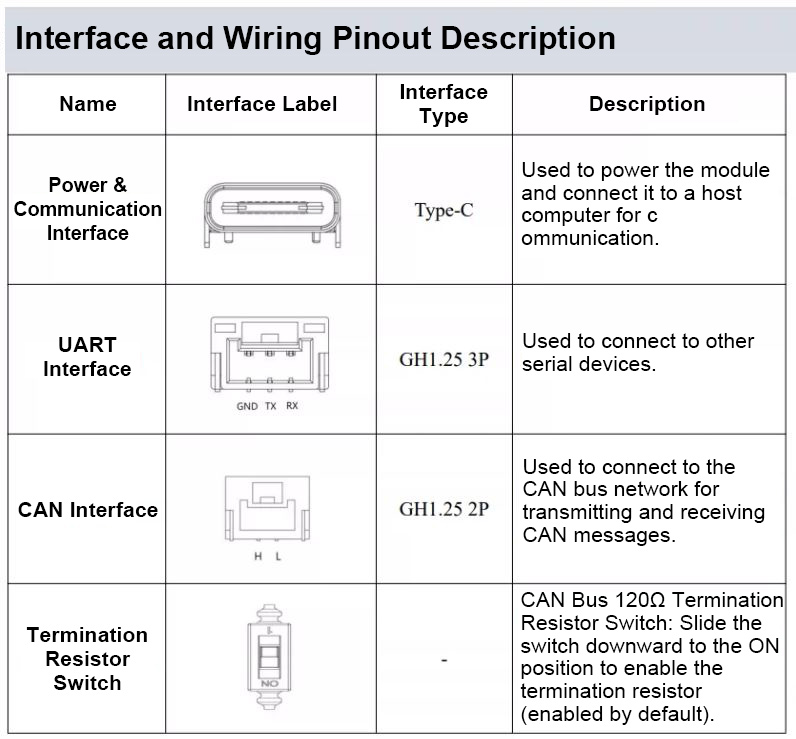
* CAN Isolation Protection
* Supports CAN FD
* Compatible with CAN 2.0A/B
* 64KB Large Buffer for Lossless Transmission of Millions of Frames
* Supports USB-to-TTL Conversion
* Supports SDK for Secondary Development
* Customizable Baud Rate up to 5Mbps
Packing List:
Package 1: USB-to-CAN FD Module (Without Enclosure) + Cables
* USB-to-CAN FD Module (Without Enclosure) for Debugging x 1
* GH1.25 3-Pin Opposite-Side Cable (300mm) for Debugging x 1
* GH1.25 2-Pin Opposite-Side Cable (300mm) for Debugging x 1
* Type-C Data Cable (USB-A to USB-C 2.0) for Debugging x 1
Package 2: USB-to-CAN FD Module (With CNC Metal Enclosure) + Cables
* USB-to-CAN FD Module (With Enclosure) for Debugging x 1
* GH1.25 3-Pin Opposite-Side Cable (300mm) for Debugging x 1
* GH1.25 2-Pin Opposite-Side Cable (300mm) for Debugging x 1
* Type-C Data Cable (USB-A to USB-C 2.0) for Debugging x 1
Packaging Details:
* Package weight: 0.16kg
Connecting to the Host Computer:
The device connection procedure is as follows:
1. Connect Device: Connect the device to the PC and open the host computer software.
2. View Device: Press the F2 shortcut key to open the device view window.
3. Close Device View: Close the device view window.
4. Open Serial Port: Click the "Open Serial Port" button corresponding to index 3 to complete the port connection.
5. Status Confirmation: Upon successful connection, the device indicator light changes from a slow flashing blue light to a slow flashing green light.