TWCS Throttle Flight Simulator Support Friction Adjustment for Thrustmaster Simulation Games War Thunder
Impossibile caricare la disponibilità di ritiro

Setup Instruction for PC:
1. Go to https://support.thrustmaster.com/. Select Joysticks / TWCS Throttle, then select Drivers. Download and install the PC driver and its custom Windows Control Panel-based interface.
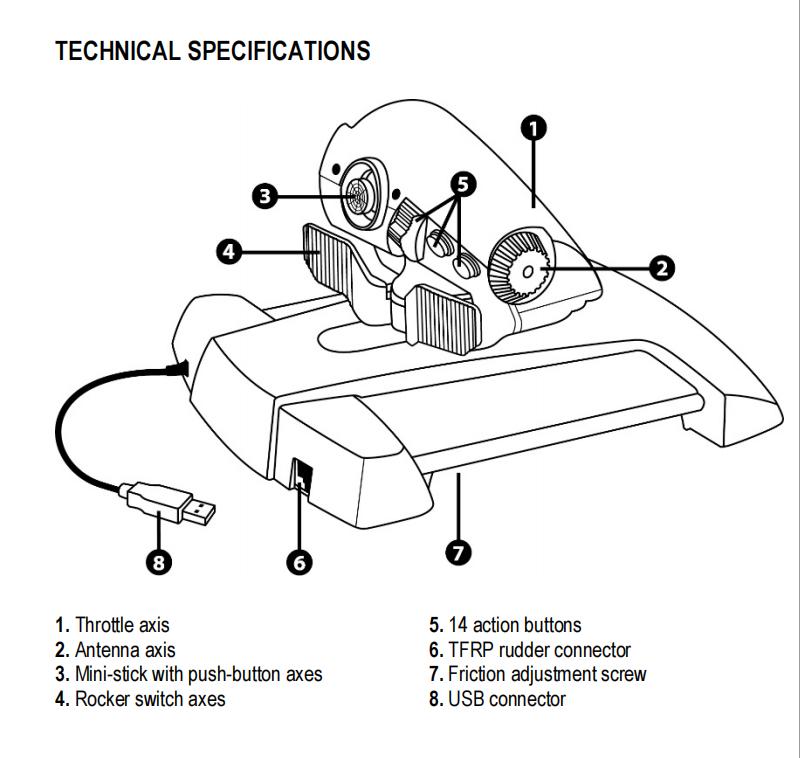
2. After installing the PC driver, connect the USB connector to one of your PC’s USB ports.
3. To access the Control Panel, select:
- Start / Applications / Thrustmaster / Control Panel or Start / Control Panel (in Windows® 10 / 8.1 / 8)
- Start / All Programs / Thrustmaster / Control Panel or Start / Control Panel (in Windows® 7 / Vista)
The Game controllers dialog box is displayed.
The device appears under the name TWCS Throttle, with the status OK.
4. In the Game Controllers dialog box, select Properties to test and view all functions.
Note:
- The Enable Center Deadzone tab allows you to activate or deactivate the mini-stick’s axes center dead zone. Your selection is automatically saved to the TWCS’s internal memory.
Package Included:
- 1 x TWCS Throttle
More Information:
- http://support.thrustmaster.cn/en/product/twcsthrottle-en/